Packet Bench
A TCP/IP network you can watch packet by packet. Follow DNS lookups, routing decisions, the TCP handshake, loss and retransmission, congestion control, and HTTP and HTTPS requests as they cross a small network one hop at a time, and open any packet to see its headers layer by layer, down to the bytes.
In October 1986, the Internet had its first congestion collapse. Lawrence Berkeley Laboratory (LBL) and UC Berkeley were 400 yards apart, three hops from each other. The data rate between them dropped from 32 kilobits per second to 40 bits per second.
Van Jacobson, a researcher at LBL, went looking for the cause with Mike Karels. He later wrote that they were fascinated by this “sudden factor-of-thousand drop in bandwidth.” His paper “Congestion Avoidance and Control,” presented at SIGCOMM in August 1988, lists seven mechanisms added to TCP. One of them is slow start. A new connection sends a single segment, and every acknowledgment (ACK) that comes back lets it send more at once. When a packet is lost, it backs off again. The rule is still part of the TCP standard today (RFC 5681).
In a textbook, slow start is usually a single graph, and the network as a whole is a stack of boxes: application, transport, network, link. The boxes tell you each layer’s role, but not what actually happens when you type an address and press Enter. How does your computer talk to the network equipment? Which part of a packet does a router look at, and what does it do? When a segment goes missing, how does the sender notice, and why does it suddenly send less? Packet Bench runs these exchanges on a small network and lets you follow them one hop at a time to find out. In the congestion control scenario, the chart shows slow start doubling the window until a loss forces it back down.
The network is simulated, but the packets are real. A discrete-event simulator, written in Rust and compiled to WebAssembly, builds every frame with the actual header layouts of Ethernet, ARP, IPv4, UDP, TCP, DNS, TLS records, and HTTP, and computes real checksums. Routers choose a route by longest prefix match, decrement the TTL, and wrap each packet in a new Ethernet header before passing it on. Each TCP endpoint is a complete state machine with sequence numbers, cumulative ACKs, an out-of-order buffer, a retransmission timer, and NewReno congestion control. The same inputs always produce the same run, so you can rewind to any moment and see exactly the same thing again.
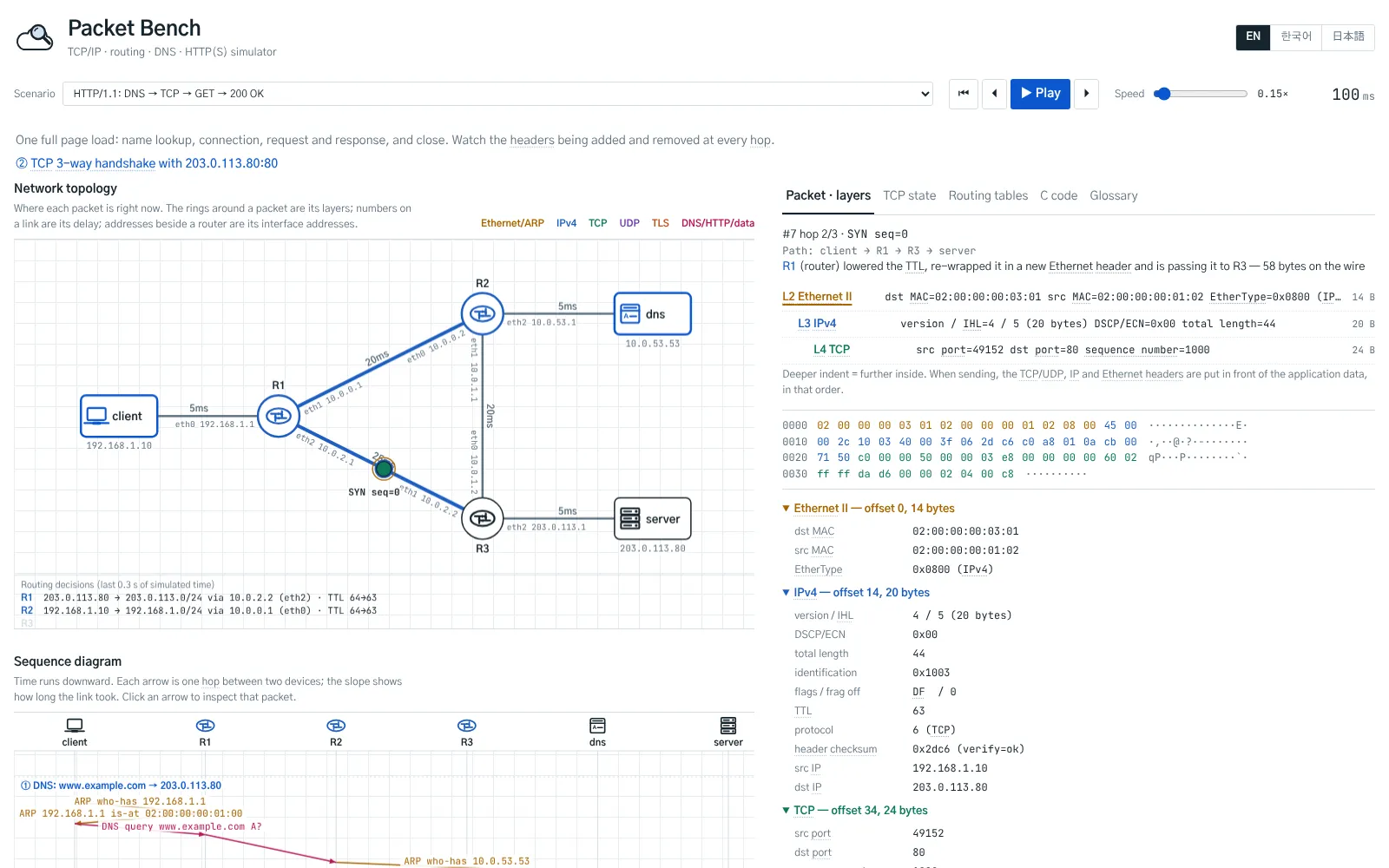
What you can see

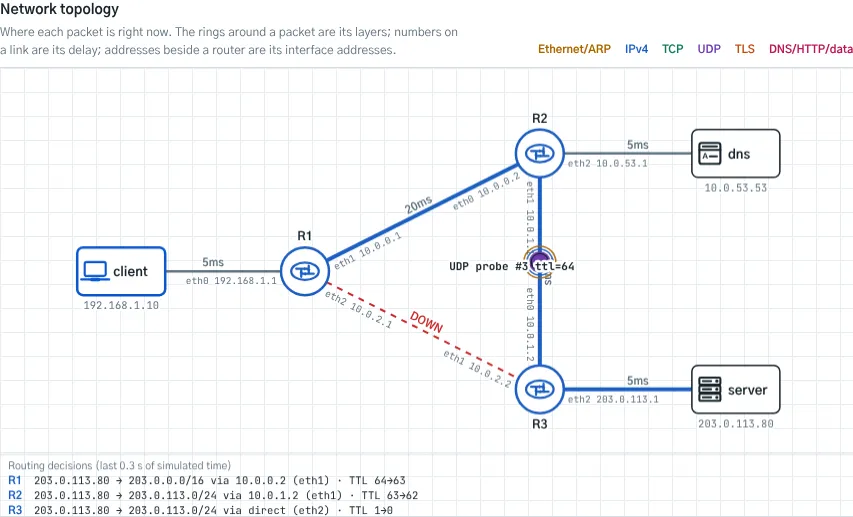
- The network map. A client, three routers, a DNS server, and a web server, labeled with each link’s delay and each interface’s address. Packets move in simulated time, so crossing a 25 ms link takes five times as long as crossing a 5 ms one, and the rings around a moving packet show which layers it is wrapped in. A strip under the map lists the routing decisions the routers have just made.
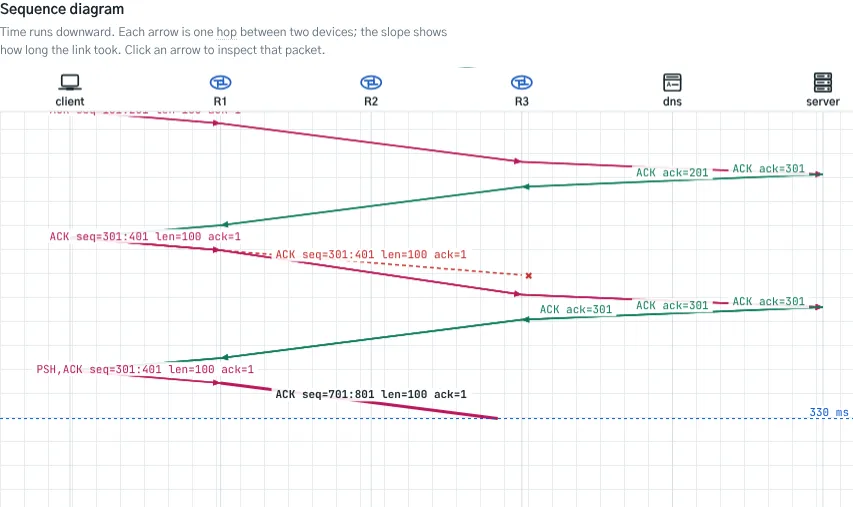
- The sequence diagram. The same run drawn as arrows over time, one arrow per hop. The slope shows how long each link took, and a lost packet ends in a ✖. Click any arrow to inspect that packet.
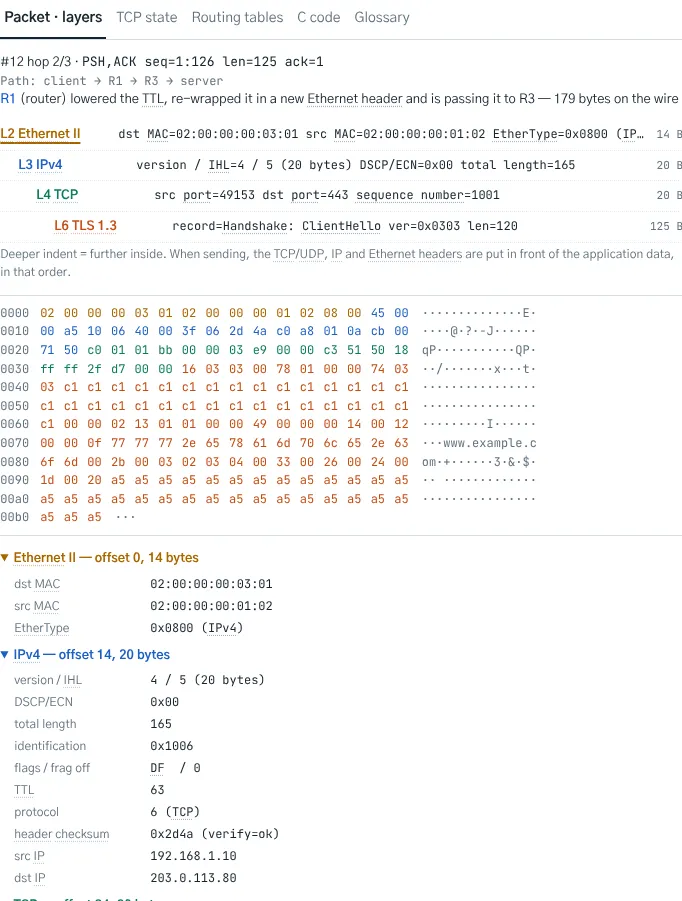
- Packet layers. The selected packet’s headers, nested in the order they go out on the wire, with the raw bytes colored by layer and every field decoded. Watch a router replace the Ethernet header while the IP and TCP headers inside stay untouched, apart from the TTL and the checksum.
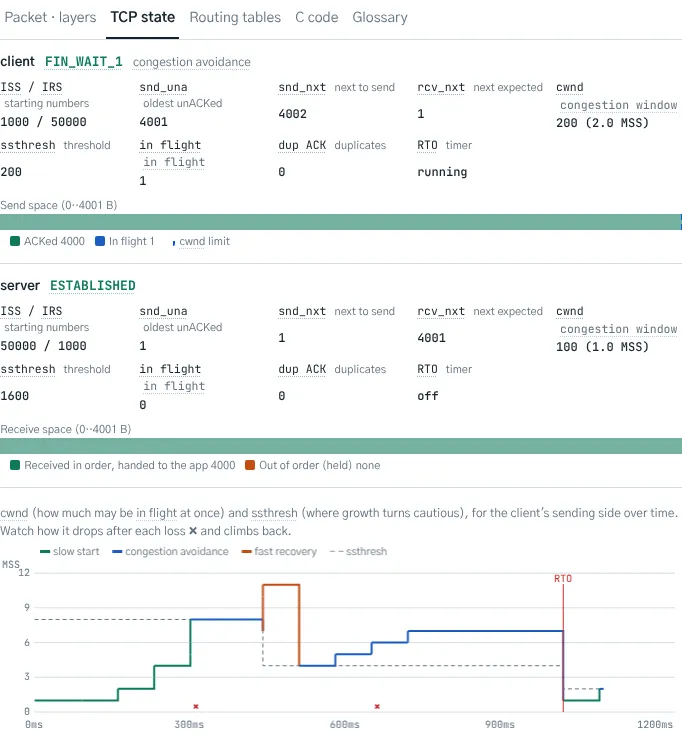
- TCP state. For each end of the connection: its state (SYN_SENT, ESTABLISHED, FIN_WAIT_1, …), its sequence numbers, the data still waiting for an ACK and the data held out of order, plus a chart of the congestion window over time.
- Routing tables and C code. Each router’s forwarding table with the matching entry highlighted, and the socket calls (
socket,connect,send,recvfrom, …) a C program would make to start each exchange. - A glossary for beginners. Abbreviations such as cwnd, MSS, TTL, and SNI are underlined throughout the app. Hover over one, or tap it, for a plain explanation.
Scenarios
There are eight, each lasting a few hundred milliseconds of simulated time:
- DNS. The client learns the gateway’s MAC address with ARP, then asks the DNS server for www.example.com over UDP.
- UDP. Three datagrams go out with no handshake. One is lost, and nobody notices.
- Routing. Longest prefix match picks the /24 route over the /16, a packet whose TTL runs out is dropped, and when a link fails, traffic takes the long way around.
- TCP connection setup and teardown. The three-way handshake, a little data, the four-way close, and TIME_WAIT.
- Ordering. One segment is lost and another is delayed. The receiver holds the out-of-order data and keeps repeating its ACK, and after three duplicate ACKs the sender retransmits immediately.
- Congestion control. Slow start, congestion avoidance, fast recovery after a single loss, and a timeout that drops the window back to one segment.
- HTTP. A complete page load: lookup, connection, request and response, and close.
- HTTPS. The same page over TLS 1.3. After the ServerHello, everything, the certificate included, travels in encrypted records, so all a router can read is the record header.
What it doesn’t do
It can’t send packets onto the real internet. A web page has no access to raw sockets, so you can’t ping google.com from here, and the network is always the same six machines. There’s no real cryptography either: the TLS messages and record headers follow the TLS 1.3 format, and the encrypted parts are a stand-in made to look like ciphertext. No real cipher such as AES-GCM is involved. IPv6, IP fragmentation, and TCP options such as SACK aren’t modeled.
Getting started
Opened from this page, the app starts with the HTTP page load. Press Play to watch the whole run, or step forward and back one hop at a time with the arrow buttons. At its slowest, the speed slider gives each hop three seconds. Pick another scenario from the list at the top, and click any packet on the map or any arrow in the sequence diagram to inspect it. The interface is available in English, Korean, and Japanese, in a light or a dark theme; switch with the moon button at the top right.