Slowing Down the JVM: A Bytecode Interpreter You Can Watch
Why I built a JVM in Rust that runs in the browser as WebAssembly, the design decisions behind it, what building it taught me, and what's left to do.
Every Java developer carries a picture of the JVM’s internals around in their head, the way a C# developer carries one of the CLR. The stack on the left, the heap on the right, a few arrows in between. Local variables live in stack frames. Objects live on the heap. new puts something there. A method call pushes a frame, and a return pops it.
I draw that picture a lot: when I code, when I write books, when I explain something to someone. The trouble is that it captures one moment of something that never holds still. The interesting part isn’t where things are. It’s how they got there: what dup actually duplicates, which stack frame an exception is passing through at the moment the JVM decides there’s no handler, why a long quietly takes two slots in a stack frame whose size was fixed before the method ever ran.
So I built a JVM you can stop and look inside.

JVM Visualizer is an interpreter for real Java class files. It isn’t merely a visualization: it executes bytecode according to the JVM specification. It’s written in Rust, built to WebAssembly, and runs inside the browser. You drop .class files (or a .jar) into a browser tab, press Start, and step through the code one bytecode instruction at a time while the page shows the thread stacks, the operand stacks, the heap, the static fields, the monitors, and every event that happens in between. To say it once more: this isn’t an animation of a JVM. It’s a real JVM whose internals you can watch at human speed. You can try it right now; everything runs in your browser.
This post covers why I built it, the design decisions along the way, what building it taught me, and what’s left to do. It’s going to be long. It isn’t quite series material, so I’m getting it all out in one go.
Why reinvent the wheel, and an odd-looking one at that
Three reasons, in the order they come to mind.
To explain it better. The book market may be in rough shape, but I still write, and I still write books. A diagram in a book can show only one moment. Our debuggers show the current moment, but only in terms of the source code; the operand stack, the frame’s slots and the class initialization state aren’t in view. In the gap between the diagram and the debugger, people’s understanding of the JVM goes blurry. I wanted a tool that fills that gap.
To understand it properly. I’ve been writing Java since 2003 (TMI, but the code I’ve typed with my own hands is mostly C++). I’ve studied the JVM and language specifications, and I’ve explained them to other people. I even set out to write a book about the JVM, then shelved it; the field has some formidable authors. But I had never actually implemented one. A JVM is a computer. Until you build a machine that has to agree with the original on every byte of output, you don’t even know what you don’t know about it.
To see how far Rust and WebAssembly can go. This site already runs a small Rust-to-WebAssembly widget, the byte flipper in The Freedom to Drop the Sign. A widget is one thing. I wanted to know whether the same stack could carry a real system: a parser, an interpreter, threads, and a UI that has to keep up with all of it.
This experiment wouldn’t have happened without an AI coding agent. I worked out the design with the agent, and the agent wrote most of the code from a written spec and implementation plan, logging every judgment call along the way. The design decisions, the reviews and the testing strategy were mine.
Why WebAssembly
I’m hardly the first person to try running Java bytecode in a browser. There are already several tools that compile Java bytecode to JavaScript or WebAssembly, such as TeaVM, Bytecoder and JWebAssembly, and CheerpJ goes further and ports the JVM itself to WebAssembly so that it executes bytecode inside the browser. They all work well. But their goal is to run Java code fast. Mine was the opposite: a tool that runs code slowly and lets you capture every moment of what it does, one instruction at a time.
Once I had decided to build an interpreter that runs in the browser, WebAssembly was the natural choice, for these reasons.
- Deployment is trivial. Nobody installs a JDK. Open the page in a browser and drop files in.
- It runs inside the browser sandbox. The code people load runs inside the VM, and the VM runs inside the browser’s sandbox. Nothing runs on a server. The whole VM is a single WebAssembly file of about 1 MB (350 KB gzipped), served from the same static site as this blog.
- The same code runs natively and on the web. The interpreter compiles natively for testing on my Mac and to WebAssembly for the page. What the tests verify is what the browser runs.
Why Rust
Rust was as natural a choice as WebAssembly. Honestly, I mostly just wanted to use Rust, but I did go looking for reasons to justify the decision.
Its WebAssembly support is mature. Unlike languages that carry a runtime with them, such as Go or C#, Rust compiles to WebAssembly without bundling a runtime or a garbage collector, so the output is small. With wasm-bindgen and serde-wasm-bindgen, Rust structs become plain JavaScript objects with almost no glue code. A language that depends on a runtime has to make every visitor download it.
Tests run natively. The interpreter’s core crates don’t depend on a browser, so a single cargo test runs all 127 tests with no browser and no bundler. The tests that run every sample and compare its output with the real JDK’s are part of that suite.
The type system fits an interpreter. A JVM is a big state machine over a spec with a fixed set of instructions and value kinds. Rust’s enums and match are made for exactly that: an Instruction enum decoded from the bytecode, one large match in the interpreter loop, and a compiler that refuses to build if a single instruction goes unhandled. The class files people load can’t be trusted. Some mischievous developer is going to grab a random file, rename it .class, and see what happens. The interpreter is designed to return an error on bad input rather than crash.
The shape of the thing
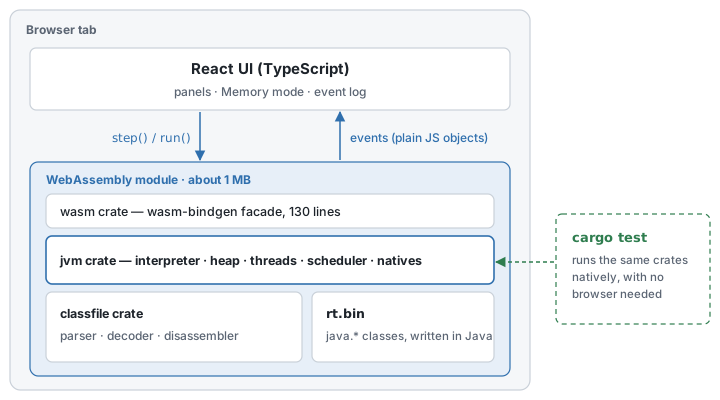
The project consists of three Rust crates, a Java source tree for the runtime library, and a React app. The classfile crate knows nothing about execution, and the jvm crate knows nothing about browsers. The wasm crate is 130 lines of glue that connects the jvm crate to the web. That settles who does what. The rest of this post goes through the decisions I made inside that structure, one at a time.
Decision 1: The VM speaks in events
The most interesting problem in building a visualizer, and the most important one, is how the picture finds out what changed. The UI could read the VM’s entire state after every step and diff it against the previous state. The VM could maintain the UI’s data structures itself. My bad ideas tend to arrive first. Instead of either of those two, I did this: every mutation of VM state emits exactly one event.
{k: 'FramePushed', tid, frame: {...}}
{k: 'Push', tid, value: {t: 'int', v: 5}}
{k: 'LocalSet', tid, index: 1, value: {t: 'ref', v: 7}}
{k: 'ObjectAllocated', ref: 7, cls: 'Point', fields: [...]}
{k: 'ExceptionThrown', tid, ref: 9, cls: 'java/lang/ArithmeticException', message: '/ by zero'}
A step returns the events it caused, and the UI’s store is a reducer (a pure function that takes the current state and one event and returns the next state) that applies them in order, the way a Redux app applies actions. The same events drive the highlight on a slot that just changed, the plain-English event log (“push int 5”, “@4.x ← int 3”, “no handler in Main.level3 → pop its frame”), and the arrows that turn thick in Memory mode.
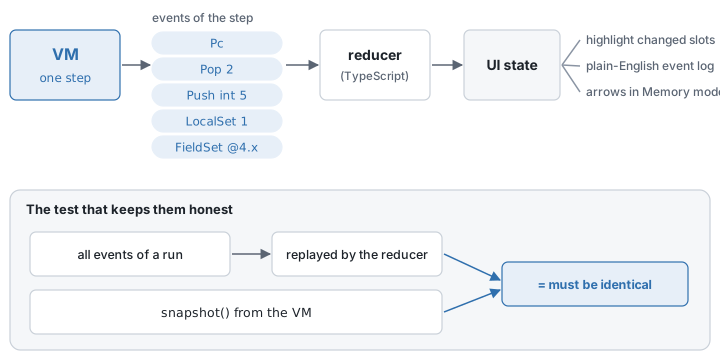
Here is the event log after one putfield in Point’s constructor: two values popped, one field written.

I also gave the VM a snapshot() interface that exports its entire state. In fast-run mode, recording every event would only slow things down, so the UI resynchronizes from a snapshot instead. Having done that, there were now two paths, events and snapshots, and that handed me a good test almost for free.
Applying all the events of a run, in order, must produce exactly the snapshot.
The Rust tests export event captures and snapshots as fixtures, and the TypeScript tests replay the events and compare. If a mutation ever forgets to emit its event, the UI silently drifts away from the VM, and this test is what catches it.
Decision 2: Types, honestly
The types a JVM deals with at run time are fewer than Java’s, and they look quite different from the types a Java developer has in mind. The interpreter’s value type follows the JVM, not the Java language.
enum Value {
    Int(i32),
    Long(i64),
    Float(f32),
    Double(f64),
    Ref(Option<ObjRef>), // None is null
    Pad,                 // second slot of a long or double
    Empty,               // a local that was never written
}
The places these values pass through most often are the local-variable slots and the operand stack, and both live inside a frame. So let me pin the term down. In this post, a frame always means a JVM stack frame. One is created every time a method is called and destroyed when the call returns, and it holds that method’s local-variable slots and its operand stack. The number of slots and the maximum depth of the operand stack are fixed by javac at compile time. Each thread has its own stack of these frames, pushed in call order, and the one on top is the current frame. None of this has anything to do with frames on a screen or in an animation.
The enum itself is simple. Still, there are three places where I took care not to hide what the JVM actually does.
boolean,byte,charandshortare allInt. That’s what the JVM does. The moment one of these four lands in a local or on the operand stack it becomes an int, and the distinction between narrow types survives only in fields, arrays and descriptors. So the UI shows the value the JVM holds, not the type the source declared.longanddoubletake two slots, and the second slot is visible. The specification gives each of them two local-variable slots and counts them as two units of operand-stack depth. Storing the value followed by aPadmakes instructions likelstore 3,pop2anddup2_x1behave exactly as the spec says, and the question from the top of this post, why the local after alongskips an index, answers itself on screen.- An unwritten local is
Empty, not zero. The slots are all there the moment the frame is created; the JVM just hasn’t stored anything in them yet. Show an empty slot as empty and you never have to explain that a frame’s size is fixed before the method runs.
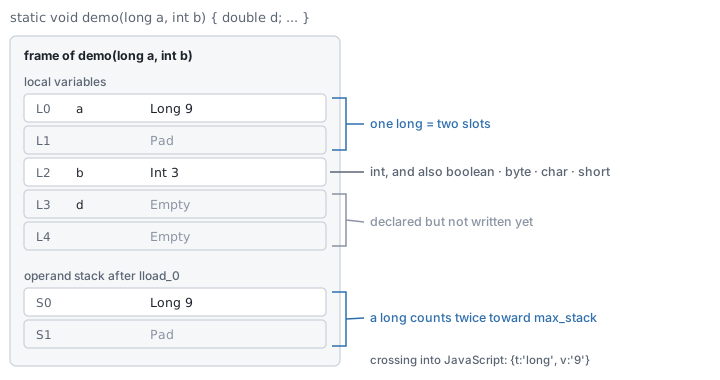
Type information has to survive the trip to JavaScript, too. A JavaScript number can’t hold every long, so longs cross the boundary as decimal strings, like {t: 'long', v: '9223372036854775807'}. Method and field descriptors are parsed into a small type tree as well. The UI needs it to work out how many values an invoke will pop off the stack, to name each of them, and to show int[3] instead of [I.
Where type information matters most is lambdas and method references. The interface method has its generics erased and takes Object, while the method actually called may not: in Function<Integer, Integer> abs = Math::abs, Function.apply(Object) ends up calling Math.abs(int). Bridging the two takes a cast and an unboxing on the way in and a boxing on the way out, and none of it may show up as a frame that wouldn’t exist in real Java. Decision 6 comes back to this.
Decision 3: No garbage collector, on purpose
The heap in this VM is just a list of objects. It’s never compacted and never collected. Object ids stay the same for the whole run and appear everywhere as @id.
If you ask whether that’s because I couldn’t be bothered to write a collector, well, that’s not entirely untrue. But once it was built, having no collector turned out to be better for explaining things. In Memory mode, an object your code can no longer reach doesn’t vanish. It stays where it was, faded, with an unreachable badge. Dropping the last reference to an object doesn’t delete it; it only makes it collectible, and a surprising number of developers think those are the same thing. In a VM with a collector the object simply disappears at some point, so there’s no way to show the difference.
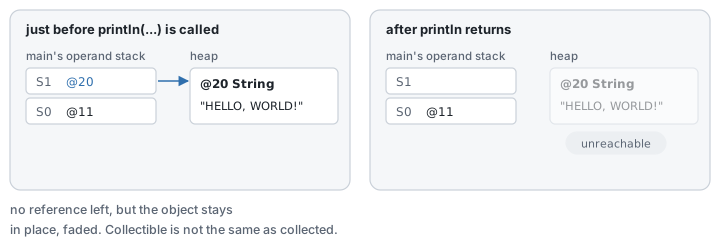
Stable positions come as a bonus. Objects stay put from one step to the next. When you’re following an arrow with your eyes and the layout reshuffles every time you press Step, there’s no point looking at the diagram.
Decision 4: A Java standard library written in Java
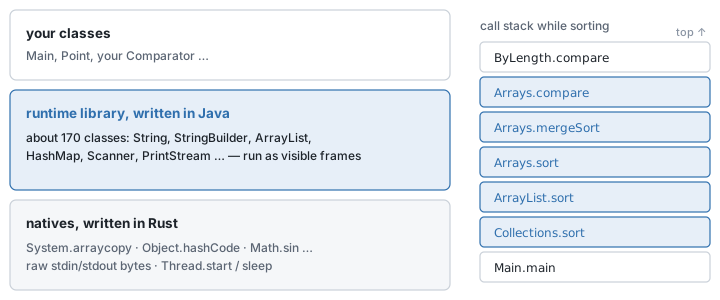
A JVM without String, ArrayList and System.out can’t even run Hello World. The usual move is to implement those classes in the host language. I went the other way. The runtime library is roughly 170 classes written in Java, about 12,000 lines. I compiled it with javac’s boot class path emptied out. The boot class path is where javac looks for platform classes such as Object and String, and normally it points at the JDK’s own class library. Empty it, and javac knows nothing about the JDK’s classes; it compiles as if the 170 classes in the source tree were the whole world. The payoff is that if library code accidentally refers to a class that exists in the JDK but not in this VM, it fails at compile time instead of surfacing at run time. The resulting class files are embedded in the VM. Only the bare essentials are native Rust functions: System.arraycopy, Object.hashCode, the transcendental math functions, raw byte reads and writes on stdin and stdout, and starting and sleeping threads.
Writing the library in Java rather than Rust bought two things.
First, the library’s internals can be shown. Watch Collections.sort call your comparator and you see the frames for ArrayList.sort, Arrays.sort and the merge sort stack up, with your comparator’s frame on top. That’s exactly what happens in a real JVM. Turn on “Step into library” and you can follow ArrayList.add growing its backing array one step at a time. A library written in Rust would have produced the right answers with none of the process in view.
Second, matching the JDK’s behavior becomes a Java problem. Code that prints a HashMap is the first to expose a library that only pretends. So HashMap uses the JDK’s table layout and hash spreading, and iteration order matches real Java for ordinary code. Random is a straight port of the JDK’s linear congruential generator (LCG), so a seeded Random produces the same sequence here as on my Mac.
There are places where it does differ from the JDK. Stack traces list this library’s frames instead of the JDK’s java.base/ frames. That’s about the only place where the output is visibly different.
Decision 5: Threads without threads
Java has threads, so our VM has to support them too. But someone stepping through code to learn from it needs a guarantee that running the same code again proceeds in the same order, and real OS threads can’t give that guarantee. So our VM has a deterministic scheduler.
A deterministic scheduler means the VM decides which thread runs when by fixed rules and nothing else. No OS and no timer gets a say, so however many times you run the same code, the threads switch at exactly the same points. The rules are these.
step() runs one instruction of the current thread. The scheduler switches to another thread when the current one blocks, ends or yields, and also when the current thread has used up its 50-step time slice while another thread is ready to run. sleep and timed wait consult a virtual clock, not the real one. When every thread is waiting, the clock jumps straight to the next deadline. There’s also a rule that the clock advances one millisecond on its own every 1,000 instructions, which wasn’t in the original plan. It went in after implementation and testing turned up busy-wait code that polls System.currentTimeMillis() while another thread sleeps, and loops forever. If every thread is blocked and none has a deadline to wake up at, the VM reports a deadlock and names the threads involved.
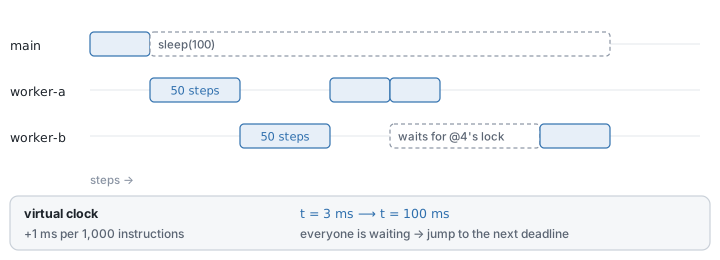
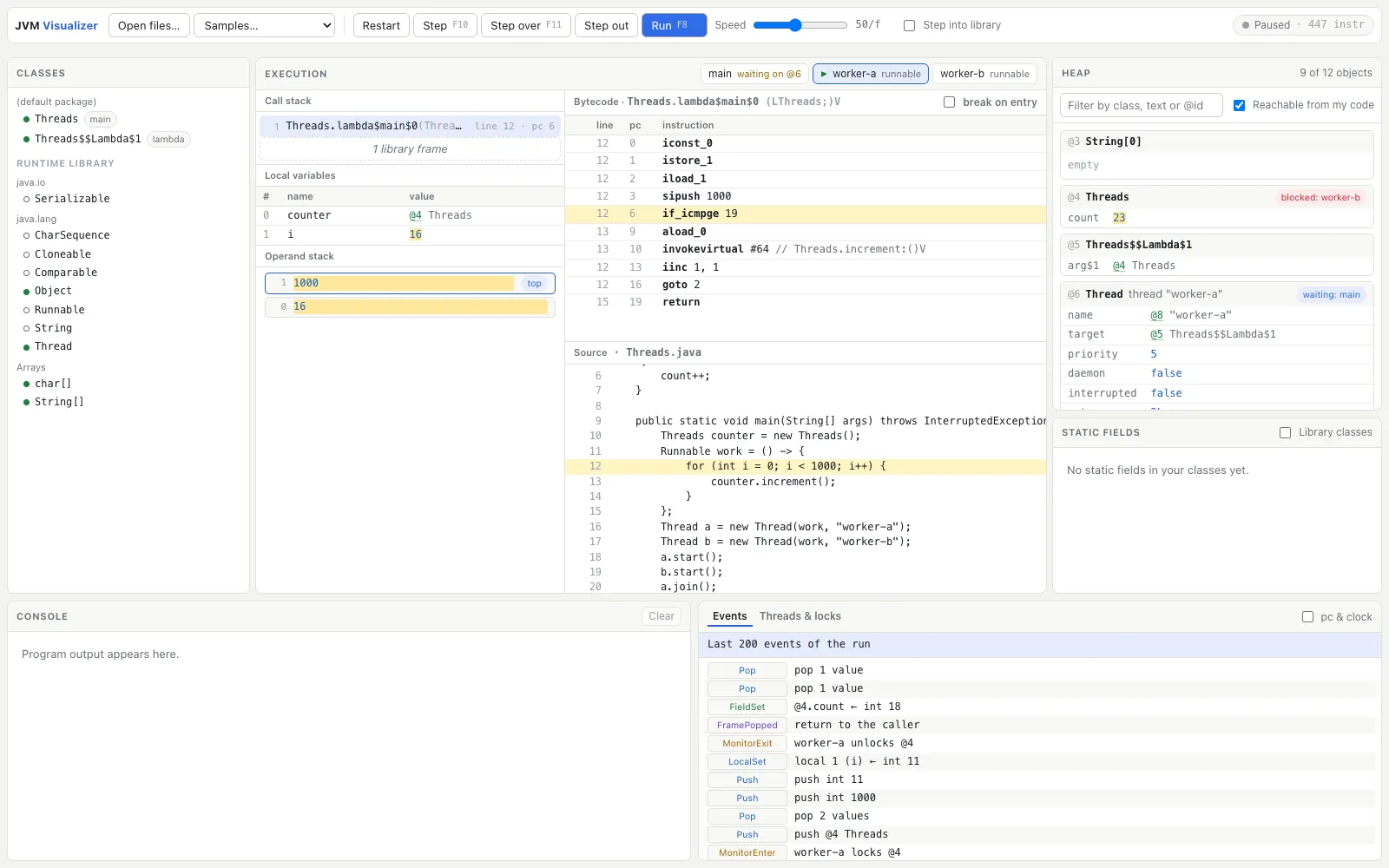
Monitors work for real too. synchronized, wait, notify and join behave as specified, and the Threads & locks tab shows which thread holds which lock and which threads are waiting. Two worker threads contending for one lock look like this:
Decision 6: invokedynamic without java.lang.invoke
Modern versions of the Java compiler, javac, compile string concatenation and lambdas to invokedynamic. In a real JVM that instruction hands control to a bootstrap method in the java.lang.invoke package, and from there on method handles turn up in droves. Implement that faithfully and a reader studying with this VM has to sit through a long tail of frames that have nothing to do with their code, all because of one line like "x = " + x.
So the VM recognizes the bootstrap methods that javac generates for string concatenation and lambdas and handles them as intrinsics.
- String concatenation completes in a single step and produces a single new
String. Only when an argument is an object does the VM call a Java helper, so that the object’stoString()shows up as a frame like any ordinary Java method. The first design boxed every primitive before concatenating, and throwawayIntegerobjects flooded the heap. No Java debugger would ever show you that, so the VM now formats primitives directly. - Lambdas become synthetic classes named
Host$$Lambda$N. Each one implements the functional interface and keeps the captured values as fields. Calling the interface method goes through a small trampoline (a short piece of intermediate code that takes the call, adjusts the arguments and forwards it to the real target). The trampoline is a native frame (one that exists only while the VM’s own code runs, rather than a Java method) that comes and goes within that one step, so it leaves a trace only in the event log; it performs the argument conversion from Decision 2 and hands execution to the lambda body. The body therefore appears as an ordinary frame right on top of the caller.
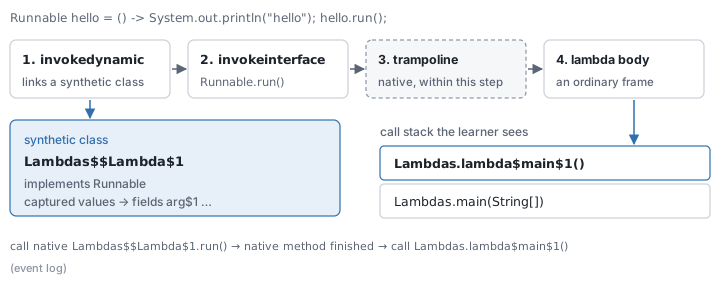
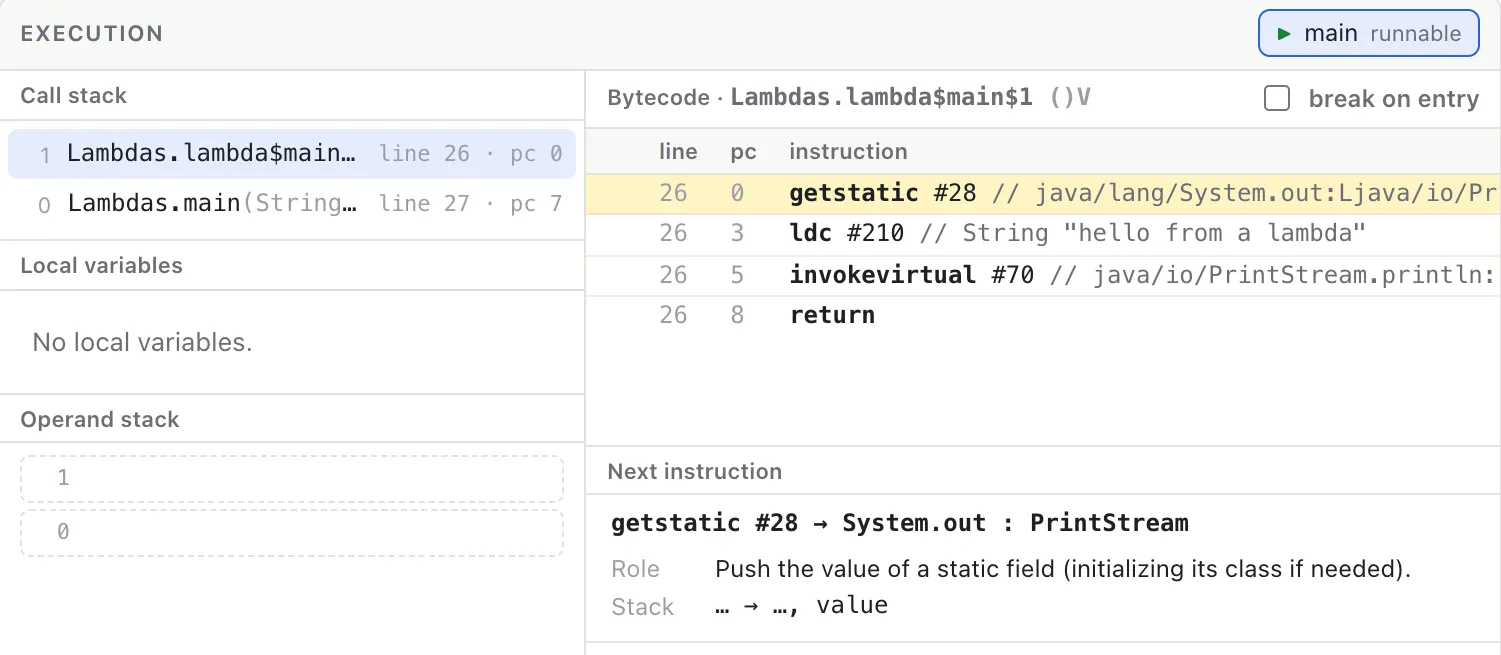
In the app it looks like this. hello.run() has just been called, and lambda$main$1 sits directly on top of main.
Other bootstraps, the ones records and pattern switch rely on (ObjectMethods, which generates a record’s toString, equals and hashCode, and SwitchBootstraps for pattern switch), aren’t supported. In those cases the VM doesn’t muddle through; it throws a BootstrapMethodError that says why.
Decision 7: Exceptions, one step at a time
In a real JVM, throwing an exception and finding its handler happens in an instant. In this VM, stack unwinding is split into steps. Each step does exactly one thing. It searches the current frame’s exception table for a handler that covers the current pc and matches the exception’s class. If such a handler exists, execution jumps there; if not, the frame is popped and the same search runs in the frame below. While that happens, the UI outlines the frame being searched and pins the exception object at the top of the heap.
Here is how an ArithmeticException is handled in the Exceptions sample:
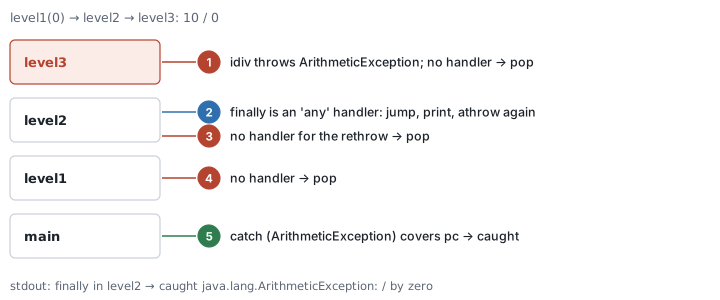
The same sequence in the app looks like this. The outline moves down one frame at a time while the exception object stays pinned at the top of the heap. level2’s finally runs and rethrows, and main catches it in the end.

Something I learned along the way: finally needs no handling in the VM at all. javac registers the finally body as an ordinary exception-table entry that catches every exception (the ‘any’ handler in the diagram above) and appends an athrow instruction to the end of the body to rethrow the exception it caught. athrow is the instruction that pops the exception object off the top of the operand stack and throws it; a throw e; in source compiles down to this one instruction too. As far as the unwinding logic is concerned, finally and catch aren’t even distinguishable.
Decision 8: Drawing memory
The first version of the UI was a row of panels: execution, heap, statics, threads, console and event log. All the information was there, but each panel kept to itself, and the only thing linking an object in the heap to a local variable was an @id label. Reading @id values and chasing them around was exhausting on the eyes.
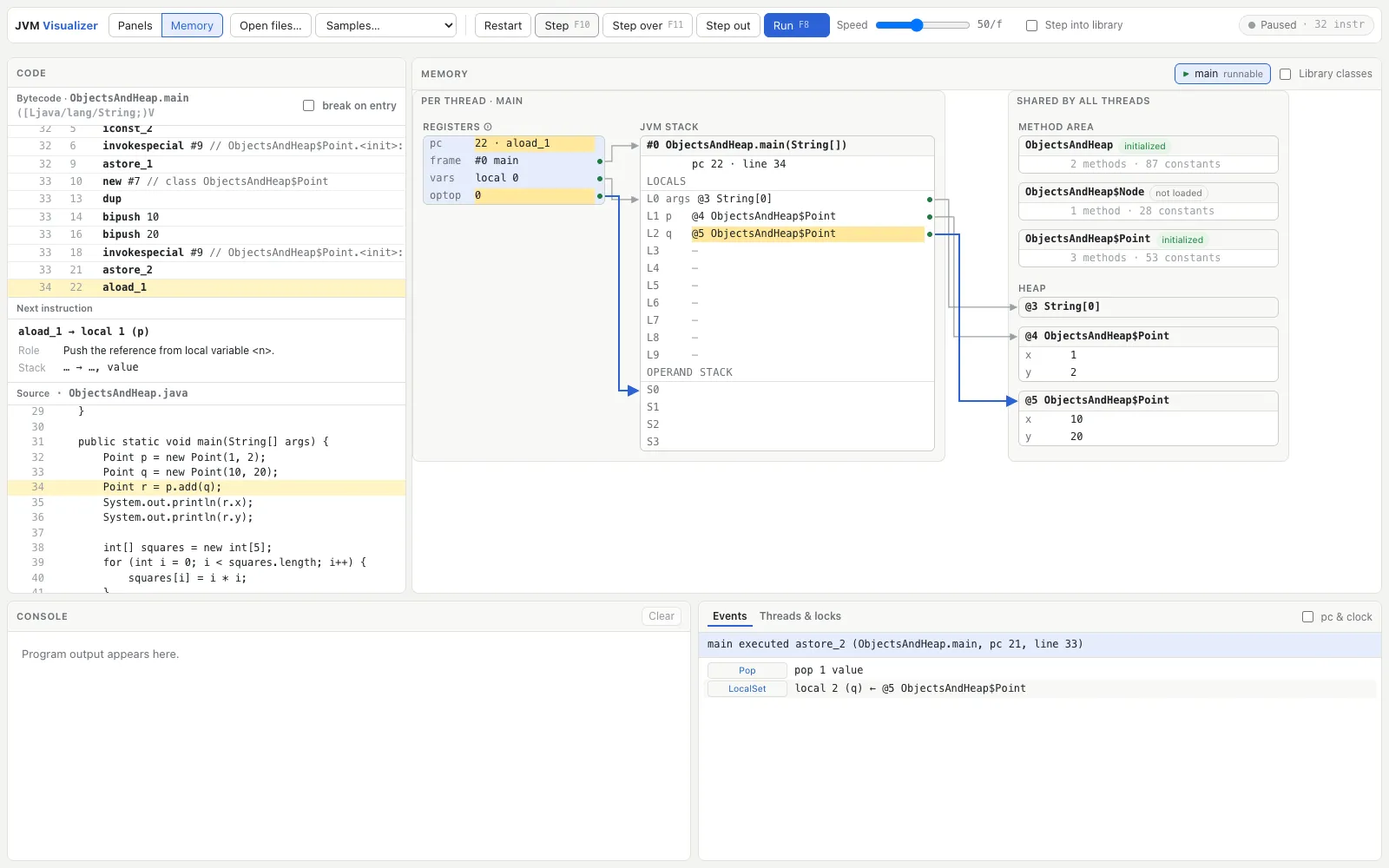
So I built Memory mode. It draws the JVM’s runtime data areas as one diagram and turns every reference into an arrow. Below is the VM while main creates three Point objects.

The two big decisions in building Memory mode were these.
Layout is computed by a single pure function. One TypeScript function takes the VM state and returns the coordinates of every box, row and arrow, and React only draws the result. The screen is a set of absolutely positioned HTML boxes plus one SVG layer for the arrows. I did consider the alternatives. Laying things out with CSS and then measuring the DOM to draw the arrows can’t be verified in a headless test environment and tends to flicker. A graph layout library would move objects around from step to step. With a pure function the result is deterministic, so properties like “no two boxes overlap” and “an object keeps its position from one step to the next” can be checked with unit tests.
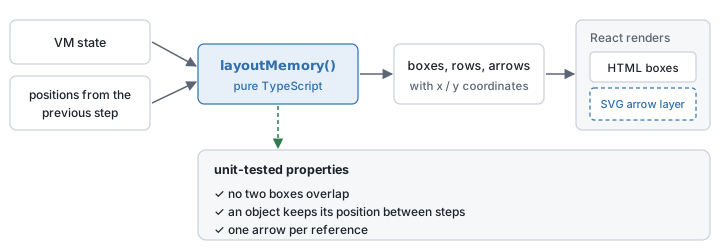
Registers are drawn the textbook way, with a note on screen that the spec doesn’t have them. Registers here aren’t CPU registers. They’re the handful of variables a VM keeps per thread to remember where it is in the execution. Most JVM textbooks say there are four of them: pc, which holds the location of the next instruction to execute; optop, which points at the top of the operand stack; frame, which points at the current frame; and vars, which points at the start of the current frame’s local variables. Memory mode draws these four as pointers into the current frame.
The thing is, the JVM specification has exactly one register, pc. The other three were in the 1995 draft of the specification, were dropped from the final spec, and have lived on in textbooks ever since. That doesn’t make the textbooks wrong. The specification defines an abstract machine and leaves it to the implementation how frames are laid out in memory, but any interpreter that executes bytecode one instruction at a time has to keep track, somewhere, of where the current frame is, where its local variables start, and where the top of the operand stack is. The textbook model draws the part the spec leaves to the implementation, and this VM really does hold those values. The textbook model is also far easier to read as a diagram. So I went with it, and added a note on screen saying these registers aren’t in the specification.
Under the bytecode listing sits a Next instruction box. It shows what the instruction about to run does, how the operand stack will change, in the specification’s own notation, and the actual values it will take off the stack right now.
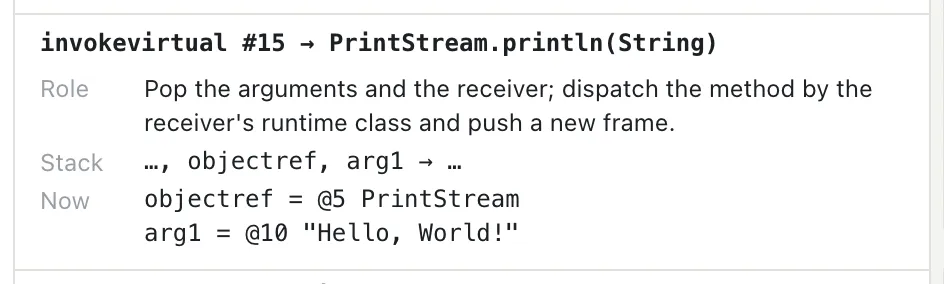
It doesn’t go as far as showing the result. What the instruction actually produces, you find out by pressing Step.
Decision 9: Class files aren’t decompiled
The class explorer on the left in Panels mode shows the structure of every loaded class. Everything is there: the version and access flags, the constant pool with every entry spelled out as readable text, the fields, the methods, and each method’s bytecode with its exception table and line numbers. The bytecode is shown in the same format as javap -c, like this:
invokevirtual #12 // Method java/io/PrintStream.println:(I)V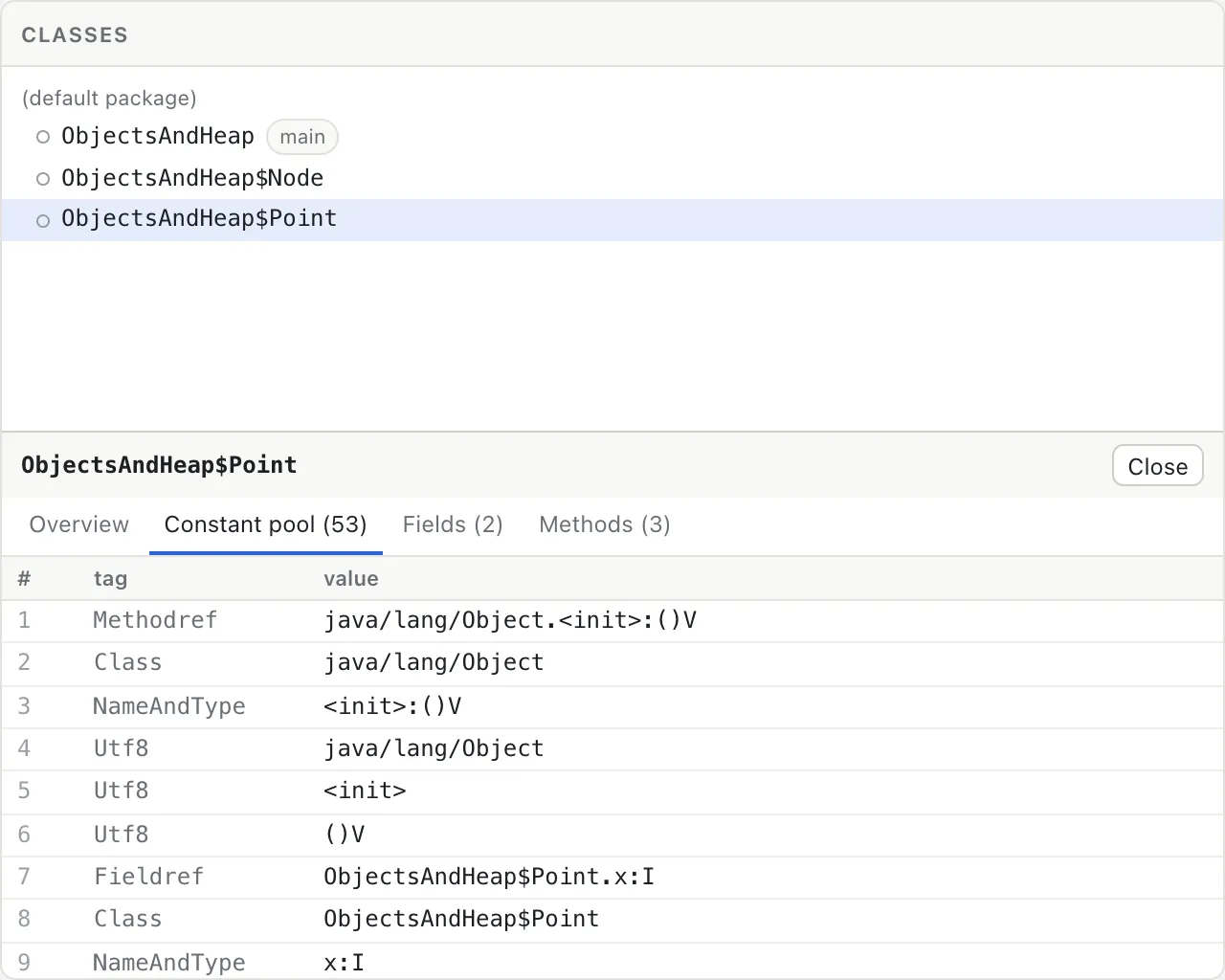
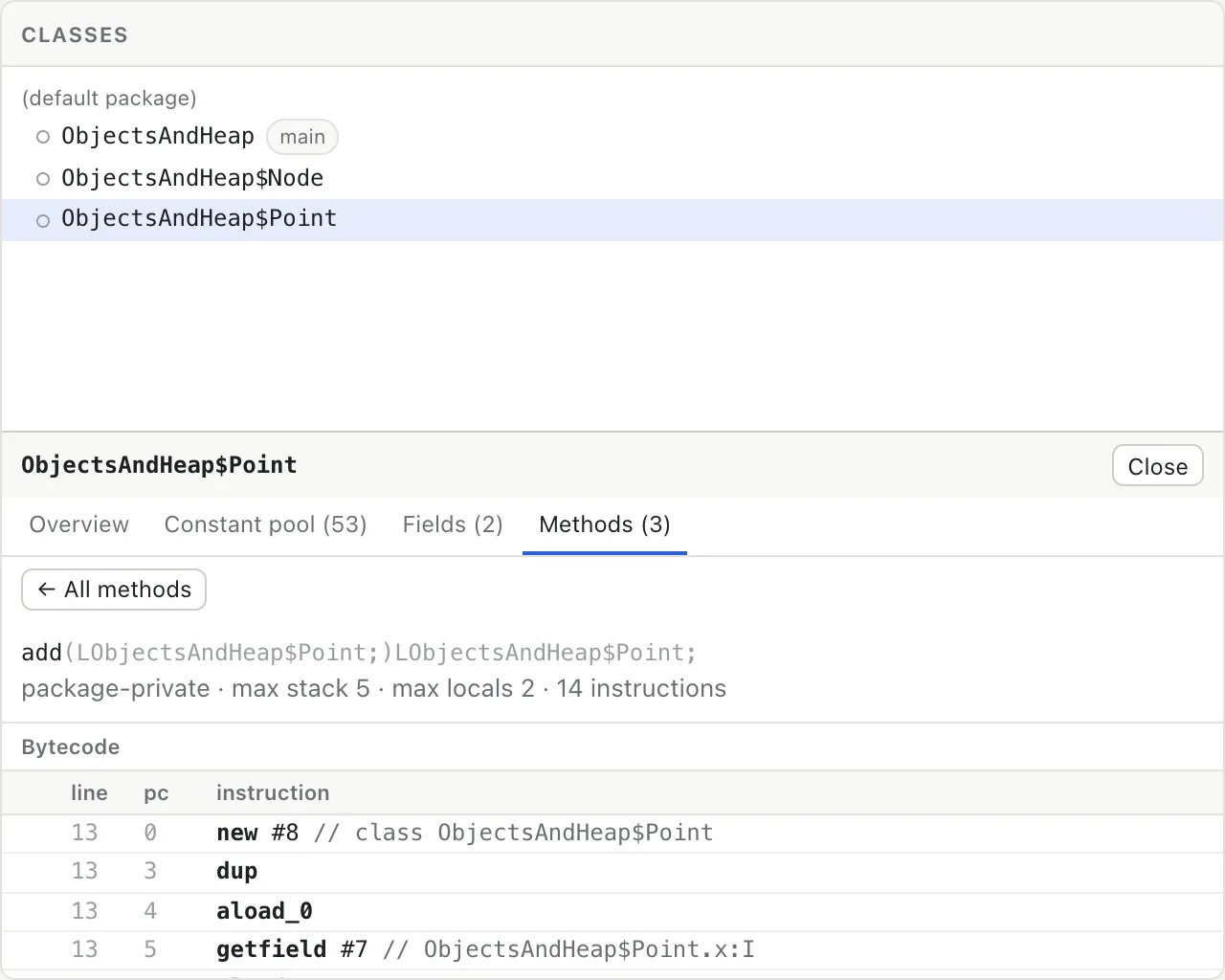
There’s no decompiler, and yes, that’s deliberate. Turn bytecode back into Java and the bytecode, the very thing I wanted to show, gets pushed into the background. If you have the source, drop the .java file in alongside the class files and the source view follows the line currently executing. If you don’t, the bytecode is all there is, and the page’s job then is to make it as readable as it can, not to pretend to be Java.
Decision 10: The JDK is the judge
Every sample bundled with the app, except the deadlock demo, is compiled with javac --release 17, run on a real JDK, and its output saved as the expected output. The Rust integration tests run the same class files in this VM and compare the output byte for byte. That spared me from agonizing over whether the VM was behaving correctly. The JDK judges on my behalf.
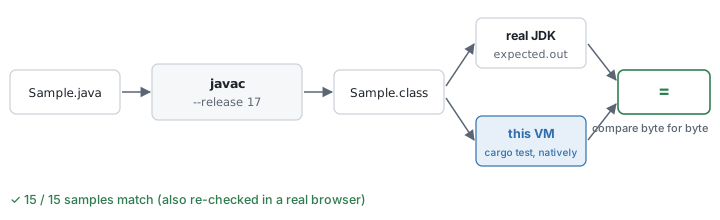
Once the JDK was the answer key, that decision dragged several others along with it. The library had to follow the behavior of the particular JDK version that produced the expected output. I matched even the way HashMap computes its initial capacity when copying another map, because that’s where iteration order diverges. The math functions use a Rust port of the fdlibm algorithms that StrictMath specifies, so the native tests and the browser produce bit-identical values. Before the first release, every sample with an expected output was also run in a real browser and its console output compared with the JDK’s. All 15 matched.
What I learned
The specification and the textbook are different documents. I knew that in the abstract; drawing the JVM’s registers made it real. The spec defines one register and textbooks describe four. To spell it out: the spec gives each thread a single pc register and defines the operand stack and local variables as data structures inside the frame, while textbooks add optop, frame and vars and draw four registers pointing into the current frame.
Whoever builds a teaching tool has to pick one of the two and must not hide that a choice was made. The same went for smaller things. Exactly when a class gets initialized, or what happens when an exception is thrown during initialization, you only know for sure by reading the spec. The first use raises an ExceptionInInitializerError; every later use raises a NoClassDefFoundError saying the class could not be initialized.
The rules that look most trivial had the widest effect. When a method is called, the caller’s pc stays on the invoke instruction until the call returns, and only then moves on to the next instruction. It sounds like nothing, but move the pc early and exception handlers whose range ends right after the call stop matching, and stack traces point at the wrong line. An instruction that triggers class initialization is similar. It makes no progress at all at that point: the initializer runs first, and then the same instruction executes again from the beginning.
Staying faithful to the spec and being good for teaching clashed often, and each time I had to pick one. Should the highlighted instruction be the one that just ran or the one about to run? The one about to run, like every debugger. Should the heap show every object or only what your code can reach? Only what’s reachable, with a toggle for the rest. May string concatenation fill the heap with boxed objects? I decided it may not. The specification has nothing to say about any of these. The answers had to come from the learner’s side.
An answer key cuts down on the worrying. With the JDK’s output as the answer key, hundreds of “is this right?” moments became one cargo test. The time spent making the samples reproducible paid for itself with plenty to spare.
With an agent, writing the design document is the coding. When an agent writes most of the code, the design document and the plan stop being paperwork and become the input that actually shapes the code. The most useful artifact from this project was the decision log the agent kept: one line per judgment call, saying what was decided and why, and what would be lost if the call was wrong. That log is what caught the places where my plan was wrong, and a good part of this post came out of it.
What it can’t do, I wrote down. The VM has known limits. Math.round(0.49999999999999994) returns 1 instead of 0, and HashMap never turns a crowded bucket into a tree. A few deliberately broken class files freeze the page instead of returning an error, and the step shortcuts are the reverse of VS Code’s. All of it is listed in the repository. A teaching tool that presents something wrong as right is, I think, far worse than one that admits to being unfinished.
What’s left
I don’t know how many people will read this post. Which is to say, the odds of getting feedback from anyone else on how to improve it are slim. All the same, here is the homework I’m leaving for my future self.
Stepping backwards (step back). It’s the feature I miss most in every debugger, and this VM is well placed to add it. Execution is deterministic and a full snapshot is already available, so keeping a ring buffer of snapshots would let you go back to just before a value changed and watch it change again.
A garbage collector. The current unreachable badge holds the spot where a collector will go. I’d like to implement a real one and show it at work on the same diagram: marking the objects reachable from the roots, then sweeping the rest, one step at a time.
Compiling in the browser. Today the only options are to load compiled .class files or pick a sample. Next comes a code editor: write Java, compile it in the page, and step straight through it. And nothing leaves the browser along the way, of course.
Until then, the current version is right here, and you can run the JVM one instruction at a time. Pick a sample, press Start, and see for yourself where your local variables actually end up.